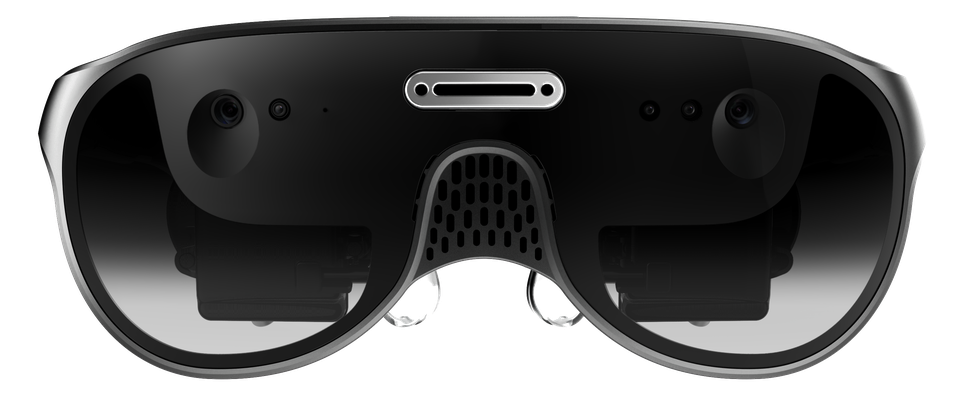
URXR One
A display for the computer you already own. Runs nothing on its own.
- Price
- $999 ✓
- Ships
- Oct 2026 ✓
- Total weight carried
- 93 g ✓
- Pixel density
- 36 PPD
Meta announced its VR Glasses at $1,300 for Spring 2027, with a 300-gram puck in your pocket. URXR One is $999 and ships this October with nothing but a cable. Here is the honest spec-by-spec comparison, including where Meta clearly wins.
Verdict
Split by the job. For work, URXR One: it drives your host's native OS directly, so you get your real desktop and apps with no second platform to manage, at $999 and shipping this October. For movies and VR gaming, Meta VR Glasses: it runs the full Quest library natively at 120 Hz with Dolby Atmos, Dolby Vision, and IMAX Enhanced certification, which no plug-in display can match. Meta wins most spec rows and also costs about $300 more, arrives about six months later, and requires a 300-gram puck in your pocket.
| Spec | URXR One | Meta VR Glasses |
|---|---|---|
| Price | $999 ✓ | $1,299.99 |
| Ships Meta has not given an exact date beyond the season. | Mid-October 2026 ✓ | Spring 2027 |
| Weight on your head | 93 g ✓ | ~100 g |
| Total weight carried Meta VR Glasses has no onboard computer. Processing and battery live in a tethered puck. | 93 g ✓ | ~400 g (incl. 300 g puck) |
| Front design Appearance, not field of view. Both are open-periphery video see-through, and both show you the room through cameras rather than through the lens. | Two separate lenses in an eyewear frame, open nose bridge | One continuous visor across both eyes |
| Works without a compute puck URXR One needs the $69 Power Hub for phone use, because a phone cannot reliably power a display on its own. Laptops, Macs, and handhelds drive it directly. | Yes, one USB-C cable to a device you own ✓ | No, the puck is required |
| Per-eye resolution | 2448 × 2064 (5.05 MP) | 2412 × 2288 (5.5 MP) ✓ |
| PPD (pixel density) Close enough that neither should decide a purchase. | 36 | 37 ✓ |
| Refresh rate | 90 Hz | Up to 120 Hz ✓ |
| Diagonal field of view Horizontal figures are not like-for-like: our 80° is measured binocularly, Meta's 70° basis is unstated. | 90° ✓ | 88° |
| Eye tracking | No | Yes, 4 cameras, with foveated rendering ✓ |
| Runs its own apps and games | No | Yes, full Quest library ✓ |
| Battery | None (powered by host) | 3+ hours, in the puck ✓ |
| Built-in audio | None (audio from host) | Dolby Atmos ✓ |
| See-through Not directly comparable: we publish latency, Meta publishes passthrough PPD. Neither has published the other's figure. | VST, under 10 ms | VST, 26 PPD, autofocus + depth |
| Host devices | Any USB-C DP Alt Mode laptop, Mac, phone, or handheld | Mac/PC via wireless virtual desktop; DP Alt Mode wired; phone mirroring |
| IPD adjustment | 58–68 mm, manual | 56–70 mm, independently adjustable ✓ |
A display for the computer you already own. Runs nothing on its own.
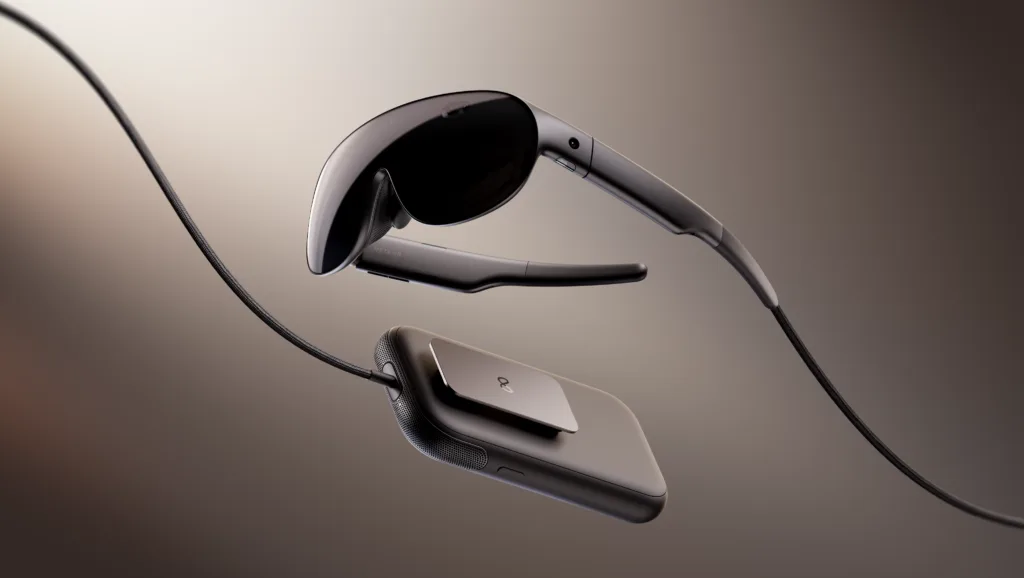
A Quest you wear as glasses, with the computer moved to your pocket.
Meta VR Glasses product image and pricing: Meta. Remaining specifications from Road to VR's announcement coverage, cross-confirmed against UploadVR. URXR One figures are our published specifications. Total weight carried counts the compute puck, visible on the cable in Meta's own product shot, which Meta VR Glasses requires and URXR One does not have.
Meta announced Meta VR Glasses at Connect on September 23, 2026: $1,299.99, shipping Spring 2027, about 100 grams on your head with a roughly 300-gram compute puck in your pocket. URXR One is $999, ships mid-October 2026, weighs 93 grams, and has no puck. The short version of this comparison is that Meta’s device is more capable and ours is available sooner for less, and which of those matters depends entirely on whether you want VR content or a wearable monitor.
Specifications below come from Road to VR’s announcement coverage, cross-confirmed against UploadVR. URXR One figures are our published specifications, listed in full on the specs page.
Meta VR Glasses is a glasses-form-factor device with no computer inside it. The Snapdragon Reality Elite processor, 12 GB of RAM, the storage, and the battery all live in a separate puck connected by a fibre optic cable, and that puck runs the same operating system as Quest 3 with access to the full Quest content library. The display is micro-OLED at 2412×2288 per eye, up to 120 Hz, 37 PPD, across an 88-degree diagonal field of view. There is eye tracking from four cameras driving foveated rendering, 6DoF, hand gestures, colour passthrough at 26 PPD with autofocus, Dolby Atmos audio, and around three hours of battery. Quest Touch Plus controllers work but are sold separately. The frame is magnesium alloy with pancake lenses and fanless passive cooling, and it carries Dolby Vision certification and is the first IMAX Enhanced certified VR device. It is a serious piece of hardware and nothing below should be read as suggesting otherwise. Those cinema certifications are also a signal about intent: Meta is aiming at premium viewing, which is a different target from reading code and documents all day.
On capability, and it is not close on several rows. Meta VR Glasses runs software on its own, which URXR One simply cannot do: plug URXR One into nothing and you have nothing. That single difference carries the entire Quest games and apps library with it. Meta also has eye tracking with foveated rendering, which URXR One does not have at all, and which lets a device spend its pixels where you are actually looking. It reaches 120 Hz against our 90 Hz, has a three-hour battery where we have none, and has Dolby Atmos speakers where we have none and route audio through your host device instead. Its per-eye pixel count is higher, 5.5 megapixels against 5.05. If you are buying on specification alone, you should buy Meta’s.
On price, on timing, and on what you carry. URXR One is $999 against $1,299.99, a difference of about $300. It ships in mid-October 2026 against Spring 2027, roughly six months earlier, and Meta has not narrowed that beyond a season. The weight difference is the one most easily missed: both sit at about 100 grams on your face, but Meta’s design moves the computer into a 300-gram puck, so the honest comparison is 93 grams against roughly 400 grams of hardware on your person, plus a second thing to charge and a cable running to your pocket. URXR One draws picture and power over one USB-C cable from a laptop, Mac, phone, or handheld you already own, which means there is no second device and no second ecosystem.
Not really, and it is the first thing you notice with both in front of you. Meta VR Glasses presents a single continuous visor sweeping across both eyes, closer to a compact goggle than to eyewear. URXR One keeps two separate lenses in a frame with an open nose bridge, which reads as a pair of oversized aviator sunglasses. Which you prefer is taste, and taste is a real factor for something you intend to wear in a cafe or on a plane.
What this difference is not is a claim about awareness. Both devices use open sides plus camera passthrough, and in both cases the view of your room arrives through cameras rather than through the lens. Meta says its “open sides and passthrough camera keep you aware of what’s happening nearby,” which is the same design goal we have. If you see a comparison claiming one of these lets you see the room and the other does not, it is wrong about both.
URXR One, and the reason is what sits between you and your desktop. URXR One is a display and nothing else, so it shows your host’s native operating system directly: your real macOS or Windows desktop, your real apps, your real files, at your machine’s own responsiveness, with no second platform, no separate account, and nothing extra to keep charged. Meta VR Glasses can also show that desktop, over wired DP Alt Mode or wireless virtual desktop streaming, and it is good at it. But its native environment is Quest’s operating system, so using it as a plain monitor is a secondary mode rather than the whole point of the device. On sharpness the two are effectively tied at 36 and 37 PPD, so text clarity will not decide this. What decides it is whether you want your working environment to be the computer you already use, or a platform that streams it to you.
The caveats on our side stay on our side. Multiple anchored screens, 6DoF, and hand gestures need the URXR Connect app, which arrives on Windows and Mac first. Plug URXR One into nothing and you have nothing, whereas Meta’s device is still a working computer on its own.
Meta VR Glasses, and it is not close. It runs the full Quest content library natively, which is years of games, apps, and immersive video that no display can reach, and Meta has aimed the hardware squarely at that job: 120 Hz, Dolby Atmos spatial audio, Dolby Vision certification, and the first IMAX Enhanced certification on a VR device. URXR One has no library of its own. It shows whatever your connected device is playing, so a film streams fine from your laptop or phone and flatscreen games run fine off a handheld, but anything that needs a VR runtime is out, and SteamVR is not supported at launch.
That split is the cleanest way to read this entire comparison. Work leans to URXR One because it drives the system you already work in. Movies and VR gaming lean to Meta because it brings its own library and the certifications to match.
If you want VR games and apps, yes, and we would tell you so plainly. URXR One does not run them, does not support SteamVR at launch, and no software update will change the fact that there is no computer in the frame. Meta’s device is the one with the content library, and Spring 2027 is a real date from a company that ships.
If what you want is a sharp, light screen for the laptop or phone you already carry, the calculation looks different. You would be waiting about six months, paying about $300 more, and then carrying a 300-gram puck to get a monitor, when the thing that drives it is already in your bag. There is also a straightforward risk in waiting: announced dates move, and “Spring 2027” is a season rather than a date.
The trade-offs are real and you should know them before buying either. URXR One has no battery, so it draws power from the host, and phone use needs the $69 Power Hub. It has no speakers, so audio comes from the connected device. Multi-screen layouts, 6DoF, and hand gestures need the URXR Connect app, which launches on Windows and Mac first with iOS and Android following. SteamVR is not supported at launch, and Linux is not supported. There is no eye tracking. If any of those is a dealbreaker, Meta’s device or a standalone headset is a better fit, and the URXR One review hub keeps the honest running list of what can and cannot be judged before shipping.
Meta VR Glasses is a Quest you wear as glasses, with the computer moved to your pocket. URXR One is a display for the computer you already own. Put plainly: buy URXR One to work, buy Meta VR Glasses to watch and play. Meta wins on capability and content, ours on price, weight carried, availability, and working in your own operating system rather than a streamed copy of it. For the wider category context, including why nobody has yet built genuinely standalone VR glasses, read VR glasses: what they are and which ones actually exist, and for the full numbers see the URXR One specs page.